Newsletters: Post/Page Embedding
You can insert WordPress Newsletter plugin subscription forms into the content of your posts and pages by inserting a code string directly into the content or the post or page using the HTML view of the editor when writing the post or page.
The quickest way of inserting a WordPress Newsletter plugin subscription form into a post or a page is to make use of the TinyMCE WYSIWYG editor button/icon with the email envelope on it. Just click on the button/icon and make your selection.
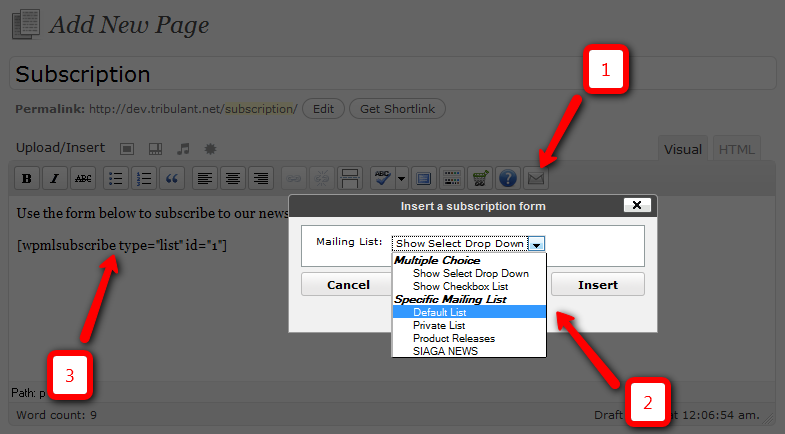
click to enlarge
The code string will always be in the format [wpmlsubscribe type="X"] … where “X” is the type of subscription form with the word “list”, “select” or “checkboxes”. When using “list” for the “type” attribute/parameter, you need to specify an “id” parameter/attribute with the ID of the specific mailing list as well. Below are some examples.
Specific Mailing List
[newsletters_subscribe type="list" id="7"]
…where “7” would be the ID of the mailing list. Replace this number with any integer of a valid mailing list inside the “Lists” section of the WordPress mailing list plugin.
Select Drop Down
Generate a subscription form which will show a select drop down menu with all your currently available or selected, non-private mailing lists in the database.
[newsletters_subscribe type="select" id="1,2,3"]
Multiple Lists Checkboxes
Embed a subscription form which will show a checkbox list with all your available or the selected, non-private mailing lists in the database so that users can subscribe to multiple mailing lists simultaneously.
[newsletters_subscribe type="multiple" id="1,2,3"]
Earn Money by Referring People
Refer customers to us with your affiliate link and earn commission on sales from your link.

